
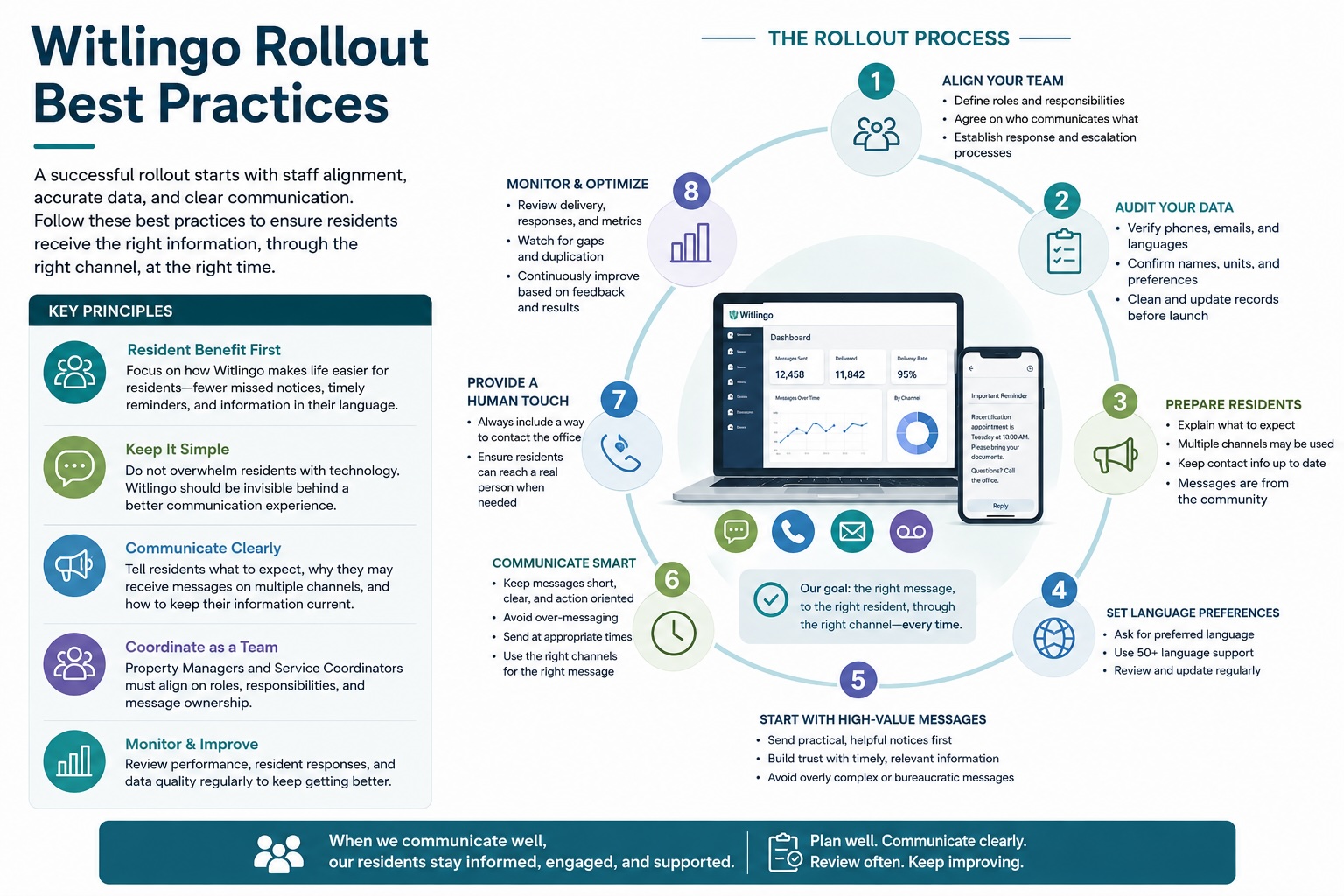
The most important principle is to frame Witlingo as a better way to stay informed, not as another system residents have to learn. Residents should understand the benefit immediately: important information will reach them more reliably, in a way that works for them.
When introducing Witlingo, avoid talking about software, platforms, automation, or technology.
Tell residents something simple:
“We are introducing a new way to make sure you receive important community information and reminders. You may receive messages by text, phone, email, or other methods depending on your preferences.”
Focus on:
- Fewer missed notices
- Easier reminders
- Information in their preferred language
- Less need to call the office to find out what is happening
- Better notice of events, deadlines, inspections, office changes, and emergencies
Residents generally should not feel that they are being asked to learn a new technology.
- Avoid: “We are rolling out a new communications platform called Witlingo.”
- Prefer: “We are improving the way we communicate with residents.”
Witlingo should largely disappear behind the resident experience.
Before the first messages go out, tell residents:
- They may begin receiving messages from the property.
- Messages may arrive by text, phone, email, or another channel.
- Messages are legitimate communications from the community.
- Some messages may be reminders of information they have already received.
- They should keep their contact information current with the office.
This reduces confusion when the first automated call or text arrives.
Residents should understand that receiving both a text and a phone call does not necessarily mean something went wrong.
For important communications, the property may intentionally use several channels.
Frame this as:
“For important notices, we may contact you in more than one way to make sure the message reaches you.”
Before sending broadly, review:
- Mobile phone numbers
- Landline numbers
- Email addresses
- Preferred language
- Resident names
- Unit numbers
- Communication preferences where applicable
Bad data can quickly undermine resident confidence in the system.
Do not assume English should be the default for everyone.
Service Coordinators and Property Managers should make an effort to identify each resident's preferred language and explain:
“When possible, we will send information in the language you prefer.”
Staff should also periodically verify language preferences because households and circumstances change.
The first few Witlingo messages should provide obvious value.
Good early messages include:
- Community event reminders
- Office closures
- Maintenance schedules
- Inspection reminders
- Recertification reminders
- Transportation announcements
- Weather related information
- Changes to previously announced schedules
Avoid making the first resident experience an overly bureaucratic or complicated notice.
The ability to communicate easily can lead to too much communication.
Before sending, ask:
“Would I want to receive this message?”
Watch for:
- Duplicate messages
- Repeated reminders too close together
- Too many low importance notices
- Sending the same information unnecessarily through every channel
- Messages at inappropriate times
Residents who feel overwhelmed may begin ignoring everything.
Residents should quickly understand three things:
- What happened?
- Does this affect me?
- What do I need to do?
Instead of:
“This is a reminder regarding the upcoming annual recertification documentation requirements.”
Use:
“Your annual recertification appointment is Tuesday at 10:00 AM. Please bring your income and bank documents. Questions? Call the office.”
If residents need to do something, say exactly what.
Examples:
- Call the office
- Bring documents
- Come to the community room
- Complete a form
- Reply to the message
- Attend an appointment
- Contact the Service Coordinator
Avoid messages that provide information but leave residents unsure about what happens next.
Automated communication should never make residents feel that the office has become inaccessible.
When appropriate, include:
“If you have questions, please contact the office at…”
Witlingo should reduce repetitive communication while making human help easier to obtain when it is genuinely needed.
One of the biggest rollout risks is residents receiving inconsistent information from different staff members.
Property Managers and Service Coordinators should agree on:
- Who communicates which types of information
- Who handles recertification messages
- Who handles community activities
- Who handles emergency notices
- Who responds when residents reply
- Who corrects inaccurate information
- Who owns resident contact information
Residents should experience one community communicating with them, not multiple staff members using separate systems.
A resident should immediately know who the communication is from.
- Instead of: “Your appointment has been changed.”
- Prefer: “Virginia House: Your recertification appointment has been changed to Thursday at 2:00 PM.”
The property or community name should be obvious.
Communication is not finished when the message is sent.
Staff should pay attention to:
- Resident replies
- Questions that repeatedly appear
- Residents who repeatedly do not receive messages
- Incorrect phone numbers
- Wrong language preferences
- Residents who appear confused
- Patterns of missed appointments despite reminders
These are signals that the communication process needs adjustment.
Do not treat Proof of Delivery simply as a reporting feature.
If an important message did not reach a resident, staff can try another channel rather than discovering the problem after a missed deadline or appointment.
The mindset should shift from:
“We sent the notice.”
to:
“Did the resident receive the notice?”
Witlingo should initially complement required communication procedures rather than replacing them.
If regulations, organizational policies, leases, or compliance procedures require written notices, posted notices, certified mail, or another formal method, continue following those requirements.
Witlingo provides an additional communication layer that helps ensure residents actually know about the notice.
Make this part of the rollout:
“If your phone number, email address, or preferred language changes, please let the office know.”
Staff should make contact information verification a routine part of resident interactions.
The first few weeks will reveal most rollout problems.
Watch for:
- Wrong phone numbers
- Residents receiving calls they do not recognize
- Translation issues
- Residents receiving duplicate messages
- Staff sending overlapping communications
- Messages being too long
- Residents misunderstanding automated calls
- Residents who prefer one communication method over another
Correct these issues quickly before they become habits.
Witlingo should not eliminate judgment.
Some residents may:
- Have difficulty using a mobile phone
- Not use text messaging
- Have hearing or vision limitations
- Change phone numbers frequently
- Prefer phone calls
Use the communication channel that works for the resident rather than forcing everyone into the same method.
The best rollout is one in which staff eventually stop thinking of Witlingo as a separate project.
- Instead of: “Should we put this into Witlingo?”
- The habit should become: “How are we communicating this to residents?”
Witlingo then becomes the normal communication layer supporting the community.
A Service Coordinator or Property Manager can keep the introduction very simple:
“We are improving the way we communicate with residents so that important information is easier to receive and harder to miss. You may begin receiving community announcements, reminders, and other information by text, phone, email, or other communication methods. When possible, information will also be provided in your preferred language. You do not need to learn a new system. Just continue using your phone and email as you normally do. Please make sure the office has your current contact information and preferred language.”
If staff remember nothing else, remember these three principles:
- Make it about better communication, not new technology.
- Measure whether residents received and understood the message, not simply whether staff sent it.
- Use Witlingo to reduce communication noise and staff chasing, not to create more of it.
Schedule a demo and see how Witlingo helps communities communicate easily and effectively, track delivery, and document outreach.