
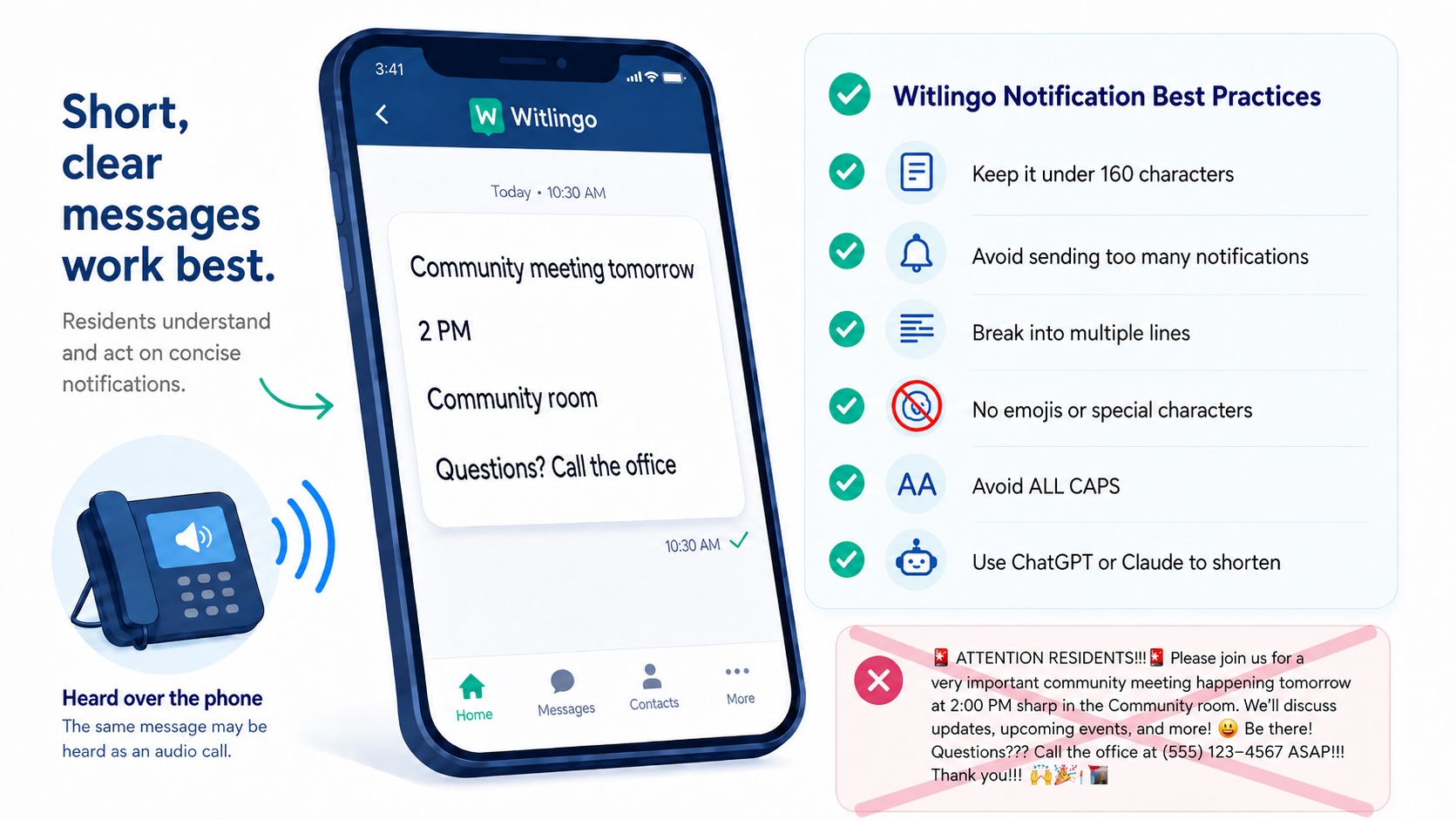
Witlingo helps you reach residents across multiple channels, including text messages, phone calls, email, and mobile apps. Because the same message may be both read on a screen and heard over the phone, the way you write it matters.
The best notifications are short, clear, and easy to understand.
Aim to keep text notifications to 160 characters or fewer whenever possible.
Residents are much more likely to read a short message than a long block of text. And remember: some residents may receive or listen to your message over the phone. A message that seems reasonable when written can feel very long when it is read aloud.
Focus on the most important information:
What is happening? When? Where? What does the resident need to do?
Instead of:
This is a reminder to all residents that our monthly community meeting will be taking place tomorrow afternoon at 2:00 PM in the main community room and we hope everyone will be able to attend.
Use:
Reminder: Community meeting tomorrow at 2 PM in the community room. We hope to see you there!
Sending too many notifications can make residents tune them out. When residents receive frequent messages, they may begin ignoring notifications altogether, including the ones that are genuinely important.
As a general rule, residents should not receive more than two Witlingo notifications in a single day, unless there is an emergency or another time sensitive situation that clearly requires additional communication.
Before sending a message, ask:
- Does this need to be sent today?
- Has the resident already received another notification recently?
- Can this information be combined with another message?
- Is this important enough to warrant interrupting the resident?
The goal is not to send as many messages as possible. The goal is to make sure residents continue to pay attention when a message arrives.
Fewer, more relevant notifications help important messages stand out.
When a message contains more than one piece of information, avoid writing everything as one long string of text.
Use line breaks to separate important details. This makes the message easier to scan on a phone and helps residents quickly identify dates, times, locations, and actions.
Instead of:
Community meeting tomorrow at 2 PM in the community room. Please bring your recertification documents and call the office if you have any questions.
Use:
Community meeting tomorrow at 2 PM.
Community room.
Please bring your recertification documents.
Questions? Call the office.
Even when the message is short, a few well placed line breaks can make it much easier to read.
Do not use emojis or unnecessary special characters in Witlingo notifications.
Messages containing emojis may need to be converted into links for text delivery. Residents can be hesitant to click links, particularly when they are not expecting one.
Emojis also do not translate well to phone calls. Witlingo strips them from spoken messages to prevent confusing or awkward audio.
For example, avoid:
BINGO TONIGHT!!!
Use:
Bingo tonight at 6 PM.
Community room.
Join us!
Simple text works best across every Witlingo channel.
Before sending a notification, imagine someone hearing it read aloud over the telephone.
Keep sentences short. Avoid complicated punctuation, abbreviations that may be pronounced incorrectly, long web addresses, and unnecessary symbols.
A useful test is to read the message aloud yourself before sending it. If it sounds long or confusing, shorten it.
Put the most important information first and separate different ideas onto different lines whenever that improves clarity.
For example:
Maintenance inspection Tuesday, August 25.
9 AM to noon.
Please make sure staff can access your unit.
Questions? Call the office.
This is easier to understand than putting all of the information into one long sentence or paragraph.
Think of each line as having one job: tell the resident what, when, where, or what to do next.
Do not write entire messages in capital letters.
ALL CAPS can be harder to read and can make a routine notification feel like an emergency.
Instead of:
IMPORTANT!!! RENT IS DUE TOMORROW. PLEASE PAY YOUR RENT AT THE OFFICE!!!
Use:
Reminder: Rent is due tomorrow.
Please contact the office if you have questions.
Reserve capitalization for normal grammar and occasional emphasis.
If your notification is too long, tools such as ChatGPT or Claude can quickly shorten it while preserving the important information.
For example, paste your message into the AI tool and ask:
Shorten this resident notification to less than 160 characters. Keep the important information and make it clear, friendly, and easy to understand. Use line breaks where they improve readability.
You can also ask:
Rewrite this so it sounds natural when read aloud over the phone.
Always review the result before sending it to make sure dates, times, locations, phone numbers, and instructions are correct.
Sometimes the information you need to share simply cannot be reduced to a short notification.
In those cases, consider using a Witlingo Micropage or Document instead of putting the entire message into the notification itself.
A Micropage is useful when you want to share longer formatted information that residents can easily open and read. A Document is useful when you already have a flyer, notice, newsletter, instructions, or other document that you want residents to access.
Keep the notification itself short and use it to tell residents what the information is about and why they should open it.
For example:
Instead of: Putting several paragraphs of information about an upcoming inspection directly into the notification.
Use:
Annual inspection information is now available.
Please review the details and instructions here: [LINK TO MICROPAGE]
Important: Long Content Is Not Delivered by Phone
Micropages and Documents are designed for residents who can open and view the content on a screen.
The contents of a Micropage or Document will not be read to residents over the telephone.
A Simple Rule for Longer Content
Use a regular notification when the message can be communicated clearly and briefly.
Use a Micropage or Document when residents need additional details, instructions, schedules, forms, or other longer content.
Keep the notification short. Put the details in the Micropage or Document. And always make sure anything residents must know by phone is included in the short notification itself.
Before you click Send, ask yourself:
Is it short? Is it clear? Is it easy to scan? Will it sound good over the phone?
When possible:
- Keep notifications under 160 characters
- Use simple words and short sentences
- Put the most important information first
- Break information into multiple lines instead of one long string
- Keep each line focused on one idea
- Avoid emojis and unnecessary special characters
- Avoid ALL CAPS
- Read the message aloud before sending
- Use Micropages when you want to send long messages
- Use ChatGPT or Claude to shorten long messages
Shorter, simpler, well formatted messages are more likely to be read, understood, remembered, and acted upon.
- 50 Resident Communication Problems Service Coordinators Face in Affordable Housing
- Social Isolation in Older Adults: How Communication Helps
- 10 Things a ROSS Coordinator Can Do to Help Residents
- AI and Affordable Housing Resources
- 20 Ways Witlingo Helps Service Coordinators and Property Managers
- Witlingo Rollout Best Practices
Schedule a demo and see how Witlingo helps communities communicate easily and effectively, track delivery, and document outreach.
